
Please allow up to an hour for any changes to take effect.
Contents
Log into your Dashboard on the NZGBC website
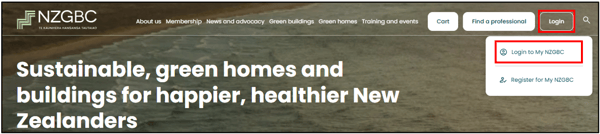
On your Dashboard, select 'Dashboard'
Update your Contact Details
Here you will find editable fields for all of your contact details - scroll down.
Don't forget to click on 'Update details' at the bottom of your screen to save your changes.
Guidance:
- Use a professional email address
- Make sure it is actively monitored
- Avoid generic inboxes unless managed well (e.g. info@ with no response)
- Address is important. Many clients want to know where your business is physically located.
Update your Photo
Recommended specifications:
- Format: Square image (1:1 ratio)
- Minimum size: 600 x 600 px (preferably 800 x 800 px or higher)
- Maximum file size - 500KB.
- File type: JPEG or PNG
- Good lighting and high resolution (not pixelated)
- Colour
Style guidance:
-
- Use a professional headshot (head and shoulders) with some clearance above the head to allow for cropping margins.
- Look directly at the camera where possible
- Wear work-appropriate attire (avoid hard hats, sunglasses etc.)
- Choose a simple, uncluttered background
- Neutral office setting, plain wall, or softly blurred background works well
- Avoid:
- Cropped group photos
- Casual/social photos
- Heavy filters or distracting backgrounds
Example best-practice photo (Thanks Piet Ubels!)

Process:
Click on 'Choose file' which will open your file explorer - navigate to the photo you have saved and select 'open'.
Click on 'Update photo'
Note: If you have current qualifications with us, and you have chosen to publish your profile on the 'Find a Professional' page of our website, this is the profile image that will be used.
Update your Description
Recommended length:
- 80–150 words (short enough to scan, long enough to add credibility)
Structure (suggested):
- Who you are (role, organisation, experience level)
- What you do (services, sectors, specialisations)
- What makes you valuable (approach, results, or differentiation)
Style guidance:
- Write in first person or neutral professional tone
- Keep it clear, plain English (avoid jargon where possible)
- Focus on outcomes and value, not just responsibilities
- Use short sentences
- Avoid long lists of qualifications (these can sit elsewhere)
Example:
I am a sustainability consultant specialising in residential and mixed-use developments, with experience delivering Homestar and Green Star projects across Aotearoa. I support design teams and developers to achieve high-performing, low-carbon outcomes through practical, evidence-based advice. My work focuses on early-stage strategy, energy modelling, and certification delivery, helping projects meet both environmental and commercial goals.
Credentials
Relevant NZGBC accreditations should appear automatically on the "Find a professional" page.
Please let us know if these are incorrect.
Organisation and affiliation
- Ensure your organisation name is current and correctly spelled
- If you are independent, clearly indicate this (e.g. “Independent consultant”)
- Keep naming consistent with your LinkedIn or company website
Regions Serviced
- Only select the regions you are willing and able to work in, including travelling to.
- Many clients want to work with someone local.
- Ensure you can meet customer expectations for any region you select.
Need Assistance?
If you require any assistance with updating your Company Profile, please reach out to the team - office@nzgbc.org.nz. We are here to help.