This article will outline the process of updating your company profile on NZGBC website
Navigate to "Manage Membership"
Editable Company Profile Information
As a NZGBC member your company information will be listed on our Meet our members page . This is an opportunity to demonstrate your commitment to sustainability and promote your business to a network of professionals. This article outlines the process of updating your company profile on NZGBC website.
How to Edit Your Member Profile
If you need to make updates or correct any details, you can easily do so through the Member Dashboard. Here’s a step-by-step guide on how to manage your membership and update your company profile.
-
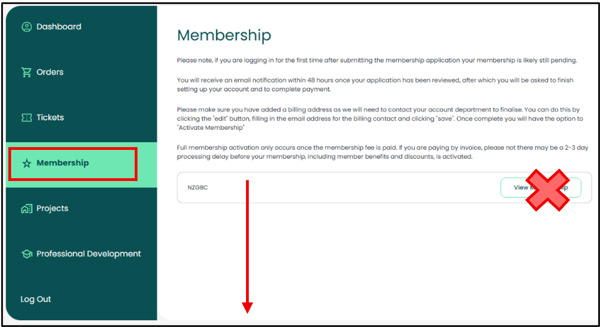
Navigate to "Manage Membership"
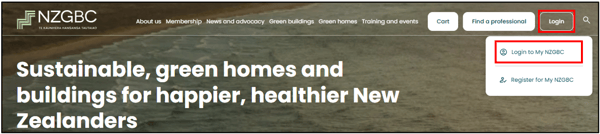
Log into your NZGBC Member Dashboard. From here, you can access the Manage Membership section. Once you’re in, look for the "Meet our members public profile" area where you can make your updates. If you can’t find the update form, please scroll down the page as per the video below.
Logo upload
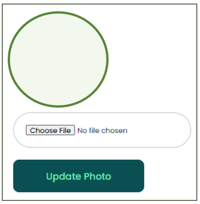
- To update the logo select "Choose File" and upload an image from your computer. After uploading a logo file, select the option "Update Logo".

Editable Company Profile Information:
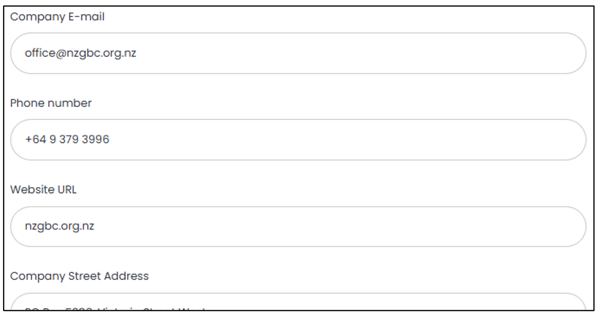
On the "Manage Membership" page, you can edit the following fields:
- Company Email: Ensure your contact email is accurate and up-to-date.
- Phone Number: Provide a current phone number for potential contacts.
- Website URL: Update your website address to direct members and visitors to the correct page.
- Street Address: Include or modify your office location.
- City, Postal Code, Country/Region: These details help with localisation and ensuring your profile is correctly displayed.
- Company Description: Write or revise the description of your business to reflect its offerings, services, or sustainability initiatives.

Profile Visibility Settings:
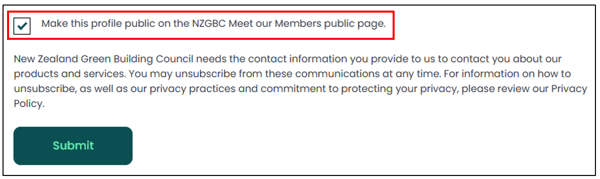
- Make This Profile Public: You can select the checkbox labeled "Make this profile public on the NZGBC Meet Our Members page" to make your company profile visible in the NZGBC Member Directory. By checking this box, your company will be featured on the "Meet Our Members" page, where others can find and connect with your business.
- Industry Information: Please note that your industry classification is not editable through the dashboard. If the industry listed for your company is incorrect, please contact the NZGBC Membership team for assistance.
- Member Since Date: This reflects the date when you first became a member of NZGBC and cannot be changed manually.
- Below you can see how your company profile will be published on the Meet our members page

Important Considerations:
- Updates and Changes: Any changes you make to your company profile will be processed within 30 minutes, but please allow up to an hour for them to reflect on the public profile pages.
- Profile Accuracy: If your logo or any information is incorrect, you can easily update these details in the "Manage Membership" section. Please ensure all information is accurate to maintain a strong presence within the NZGBC community.
Contacting NZGBC Membership Support
If you encounter any issues or need assistance with updating your profile or membership details, feel free to contact the NZGBC Membership team for support. They will be happy to help ensure your company’s profile is accurately updated.