
Your organisation can have multiple Key Contacts. Key Contact details should be kept up to date to ensure we communicate with the right people.
Please allow up to an hour for any changes to take effect.
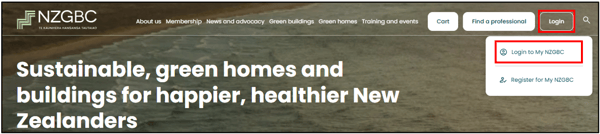
Log into your Dashboard on the NZGBC website
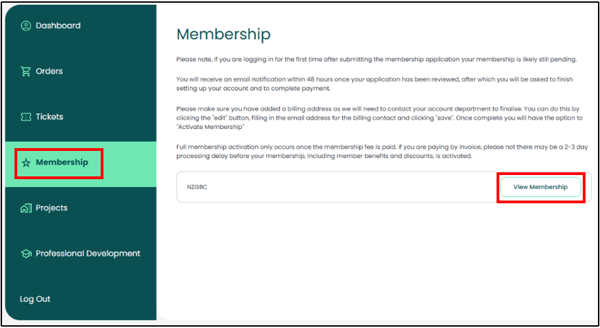
On your Dashboard, navigate to "Membership"
Select 'View Membership' on the right-hand side:
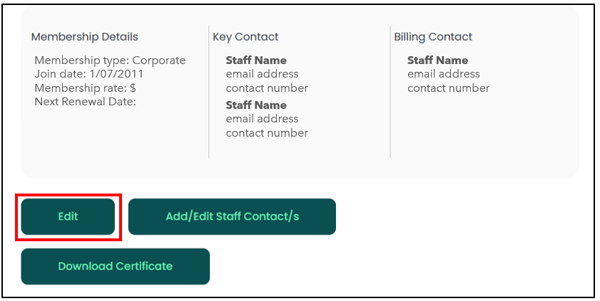
Add/Remove Key Contacts:
Click on the 'Edit' button:
Next you can select the '+' icon to add new Key Contacts, or select the 'bin' icon to remove them.
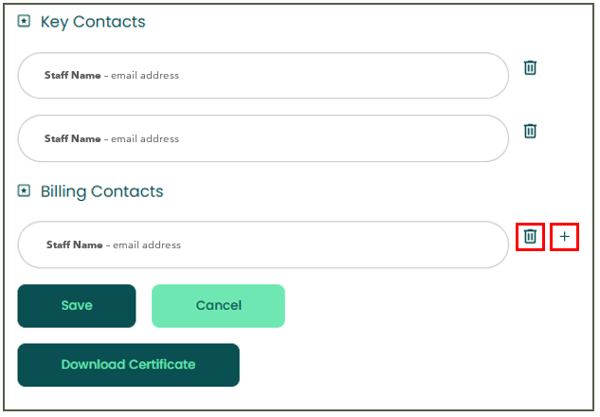
The added and/or removed Key Contacts will receive a confirmation email.
Need Assistance?
If you require any assistance with updating your Company Profile, please reach out to the NZGBC Membership Team.